
If you want to “delete” your Stake account, Stake says full deletion is not possible because it must retain some data for legal and compliance reasons. What you can do is close the account indefinitely, which cuts off access, promos, and marketing, and puts you on a minimum 24-hour cooling-off period if you ever try to come back.
Account closure is handled by email. Stake’s help centre directs users to contact accountclosure@stake.com to request an indefinite closure. Before you do that, withdraw any remaining balance and grab anything you might need later (transaction records, screenshots). Once the account is closed, you should assume you won’t be casually logging in to “just check something”.
If the real goal is to stop yourself from playing, use self exclusion inside Stake Smart. Here’s how Stake explains it:
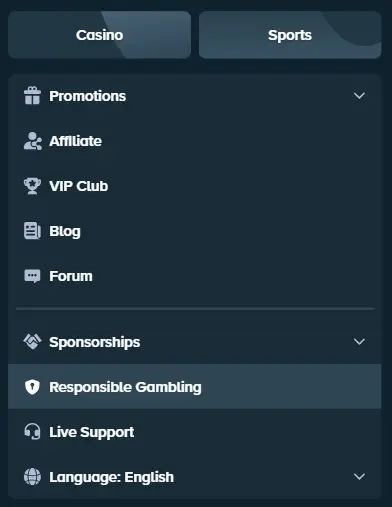
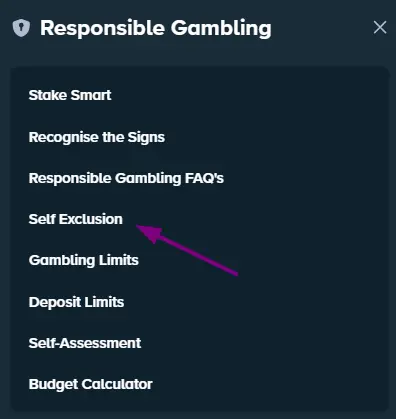
- Go to Responsible Gambling > Stake Smart > Self Exclusion.
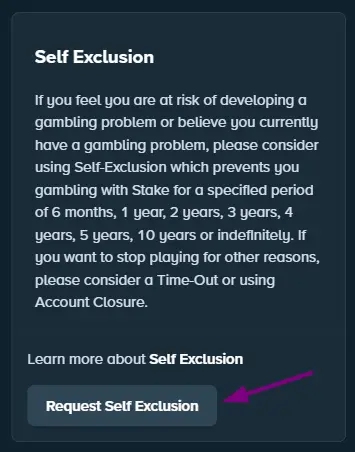
- Click “Request Self Exclusion”.
- Choose your period and confirm (options include 6 months up to 10 years, or indefinite).
Once it activates, Stake says you can’t use the account during the exclusion. Fixed periods reopen automatically when time runs out; “indefinite” has a minimum 6 months and any return requires a review via support.
In my experience testing the site, I didn’t get blocked immediately after submitting the request or receive any email. However, when I tried to log in again, I saw a Self Exclusion message and wasn’t allowed to access my account.
I want to note that the process turned out to be simple and very fast. For me, it took less than three minutes.